

Despite powering the majority of the Internet, Linux has never broken through as a mainstream desktop operating system. There is a long running joke among the tech enthusiast community that whatever year we’re in, is the year of the Linux desktop.
However, 2026 might be the year of the Linux desktop if you’re a Windows 10 user who hasn’t upgraded (or can’t upgrade) to Windows 11. If that describes you, then you might want to check out Zorin OS 18, a version of Linux designed to make you feel like you’re running Windows.
Why Linux hasn’t succeeded in the consumer market
Though Linux’s marketshare has increased in 2025 (3 percent as of writing this), and it’s becoming a formidable gaming platform with SteamOS, it’s unlikely that 2026 will be the year it becomes even 10 percent of the desktop computing space.
There are several reasons Linux hasn’t taken off.
First, there are many distributions (“distros”) which share a common OS kernel – the core engine of the OS – but are slightly different. Some distros are general purpose, while others serve edge cases. For someone new to Linux, it’s not clear which distro to commit to.
Second, the variety of different Linux distros means there no single user interface. This presents users with lots of choice, but it also has fragmented the platform (much like Android phones).
Third, compatibility with computer drivers make the likelihood that Linux will work on your machine a toss up. Compatibility has improved greatly over the years, but it’s still not perfect.
It’s for these reason that’s Linux is stuck between 2 and 5 percent marketshare… for now.
(Funny enough, Microsoft famously used Linux’s rise as evidence that it wasn’t a monopoly during its antitrust legal fight in the 1990s.)
Tough times for Windows 10 users
Windows 10 had a good run. It launched in 2015 and had received consistent upgrades and security support until October 14, 2025—the official end of support date. (If you want a free year of Windows 10 support, see Episode 79 of the Examining podcast where I provide some options.)
Unfortunately, many Windows 10 users are unable to upgrade to Windows 11 due to strict hardware requirements. To run Windows 11, your PC has to support Trusted Platform Module (TPM) 2.0 and secure boot. TPM is a hardware chip built-into modern computers for storing cryptographic keys and sensitive data. Secure boot is a firmware requirement that ensures only trusted software can start the computer. If your computer was made before 2016, there’s a good chance your machine doesn’t support these security requirements and, therefore, can’t run Windows 11.
For those stuck on Windows 10, this poses a security risk over the long-term, as security vulnerabilities will no longer be patched.
Zorin Linux to the rescue
This is where Linux comes in to save the day. Linux is famous for running, and running well, on older hardware.
I love experimenting different with Linux distros, such as Mint, Ubuntu, Arch, Fedora, and Pop!_OS, and many are easy to get used to. But, Zorin OS (version 18) is a special Linux distro because it truly does feel like Windows. YouTuber SavvyNik has a great overview video where he showcases the look and feel of Zorin OS and how similar it can be configured to work like Windows 10.
I’ve been playing around with Zorin OS 18 and there are a few key things that stood out to me.
Look and feel
Zorin has several themes you can choose when you first boot the OS. There’s a Windows 10-like them, as well as a macOS and Ubuntu Linux style theme. Zorin is clearly targeting users of other major platforms.
The Files app is very similar to the Windows 10 files explorer. Based on my testing, I have no doubt a Windows 10 users would instantly recognize this.
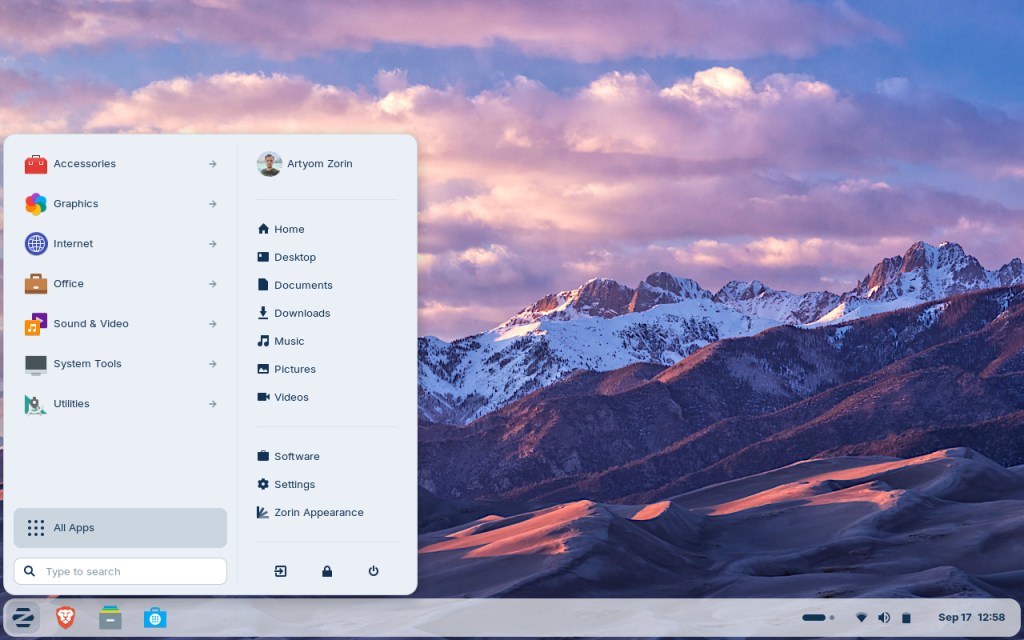
Zorin has a start menu equivalent in the bottom-right (though you can also centre it like Windows 11). The ability to see your apps in a list, as well as top folder directories is very intuitive.
System settings are presented almost identically to Windows 10. This is where you can adjust everything from the theme, WiFi connection, online accounts, or keyboard shortcuts.
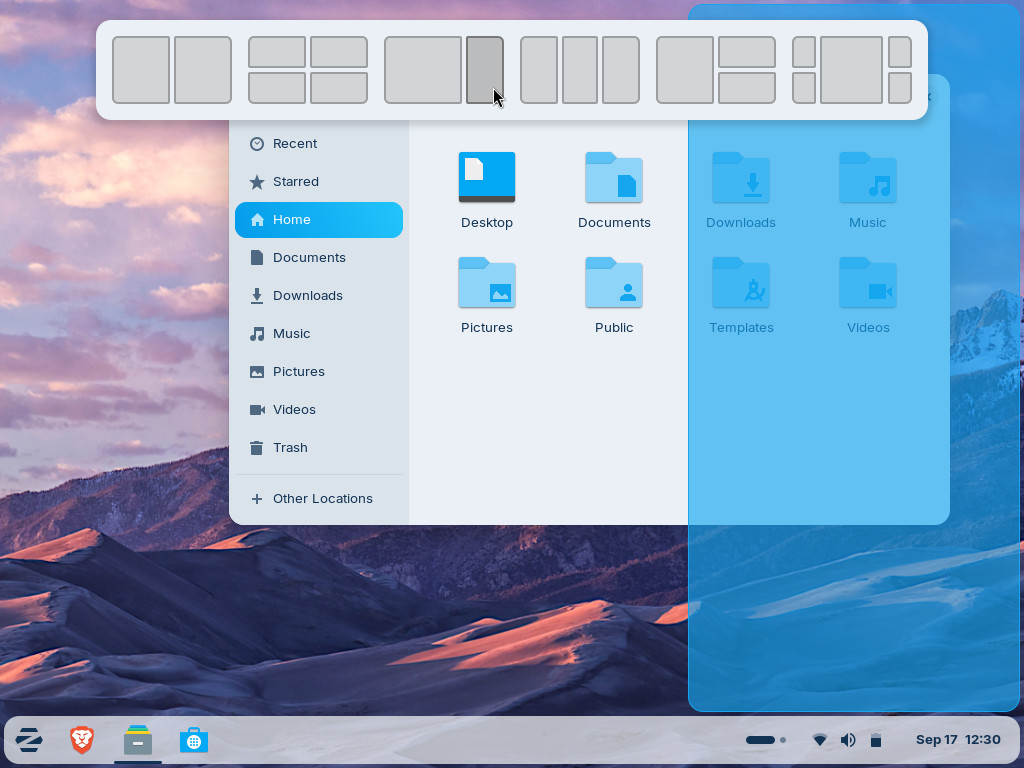
Window snapping, arguably the core feature that puts “windows” in Windows, works how you’d expect. Windows ca snap to a side-by-side view, into quadrants, or into columns, just by dragging the application windows around. Multiple desktops is also supported, and Zorin has the option to enable a 3d cube effect for switch between desktops if you wish.
Linux is more palatable today
The things holding Linux back (mentioned above) are still true, but Linux distros are much easier to use today.
Distros like Zorin OS 18 have clearly undergone some serious UX testing. The look and feel of Linux, including Zorin, Ubuntu, Mint, and Arch, are all excellent. I’d argue their UIs are even more consistent, since Windows 11 still has visual artifacts of its past fast hidden within its system menus.
The functionality of web-based apps has also mostly solved one of Linux’s biggest shortcomings—software compatibility. If most of your computer use involves using a web browser to check email, use Google Docs, do your banking, use social media, and read articles, using Linux isn’t a barrier for you. If anything, your actual OS is the web browser, not Linux or Windows.
If you do require desktop applications to accomplish tasks, there are many capable alternatives on Linux. Here’s what I recommend all Linux users install.
Web browser: Both Chrome and Firefox (and other browsers) are supported by Zorin, and most Linux distributions. That alone fixes 80% of our problems.
LibreOffice: A Microsoft Office replacement: LibreOffice is an open source alternative that has come a long way. It has a word processor (does anyone say that anymore?), a spreadsheet client, and a presentation software like PowerPoint. It will also open Word, Excel, and PowerPoint files. If LibreOffice doesn’t float your boat, also remember that Google Docs in the web might be all you need. If you have an Apple iCloud account, you can use Pages, Numbers, and Keynote in the web browser too.
Notes app: If you use OneNote, or Apple Notes on the Mac, there are actually better alternatives on Linux (and other platforms). Obsidian is an excellent notes archive tool for power users, and I blogged about this a while back. SimpleNote and Joplin are also excellent, and are both free open source programs.
Photos: digiKam is a great photo manager app for Linux. If you need more powerful editing tools, you can also install GIMP.
Give Linux a shot
For some, getting a new machine with Windows 11 will be the bets choice, and that’s just fine. I like Windows 11 too!
But, if you’re not feeling like spending any money. Or, if you don’t need Windows specifically for your daily computer use, I’d recommend giving Linux a shot before making that trip to Best Buy. There are many guides on how install it on your machine. I’ve seen many Windows and Mac users quickly users get comfortable with Linux quickly.
If you’re stuck on Windows 10, and you’re looking for an off ramp, 2026 might be the year of the Linux desktop for you.
 Erik Christiansen
Leave a comment